# Queue

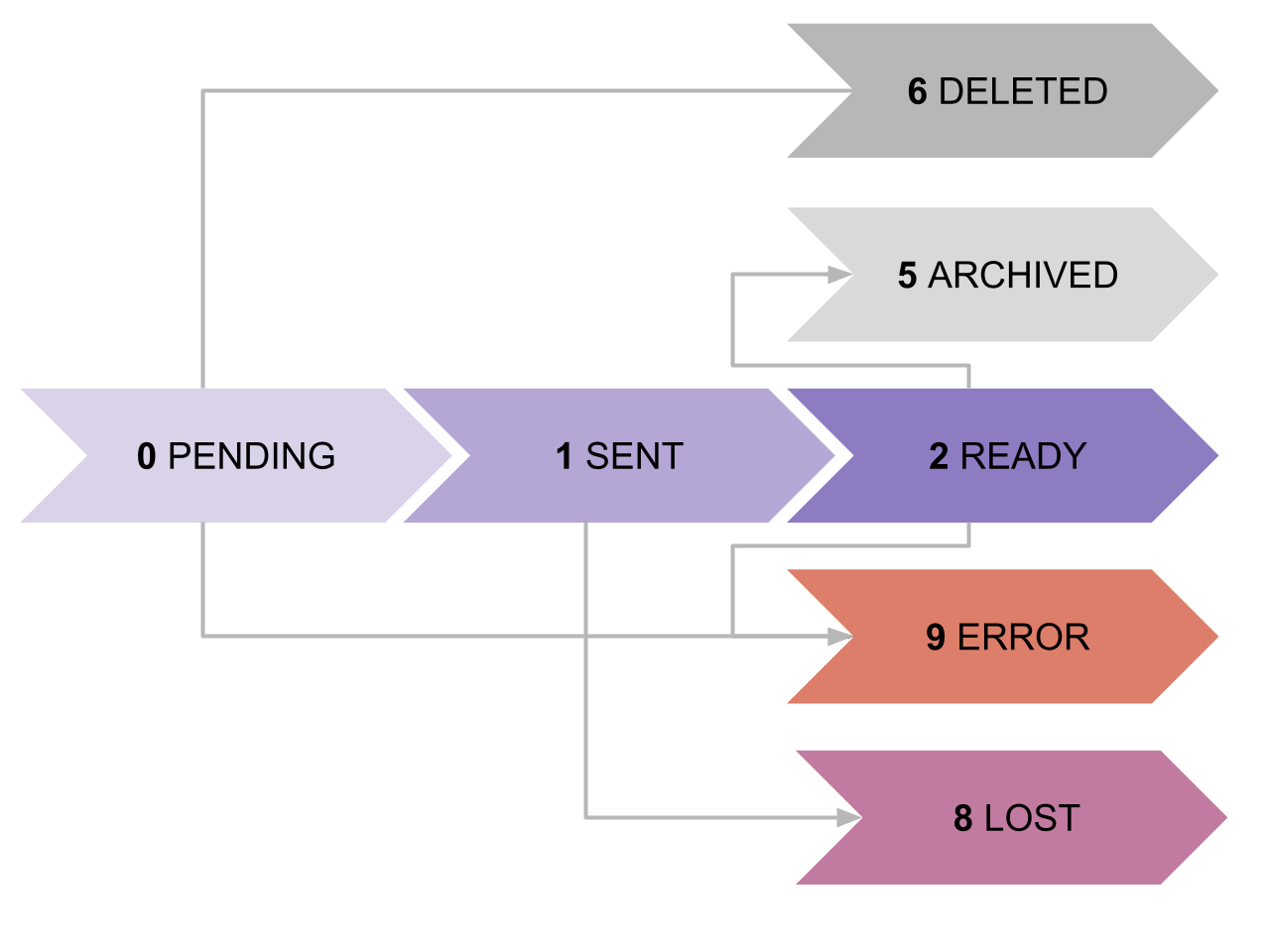
### Queue Status Life Cycle

<figure><img src="/files/woS4B93OCeYRIrxS14x1" alt=""><figcaption><p>Queue Status Lifecycle</p></figcaption></figure>

#### Status Code Description

<table><thead><tr><th width="137" align="right">Status</th><th width="87.33333333333331" align="center">Code</th><th>Description</th></tr></thead><tbody><tr><td align="right">PENDING</td><td align="center">0</td><td>Request has been received in the upload queue but not yet sent to satellite.</td></tr><tr><td align="right">SENT</td><td align="center">1</td><td>Request has been sent to satellite and is pending execution. These requests can no longer be deleted.</td></tr><tr><td align="right">READY</td><td align="center">2</td><td>Response has been downloaded from the satellite, passed a health check and is ready to be read by the user.</td></tr><tr><td align="right">DELETED</td><td align="center">5</td><td>The request has been deleted.</td></tr><tr><td align="right">ARCHIVED</td><td align="center">6</td><td>When a request has been deleted after it has been sent.</td></tr><tr><td align="right">LOST</td><td align="center">8</td><td>The request was uploaded but it did not return in the next window.</td></tr><tr><td align="right">ERROR</td><td align="center">9</td><td>There was an error with the request.</td></tr></tbody></table>

Requests can be deleted to allow for some housekeeping.

### Protocol

The API is non-blocking but asynchronous. The endpoints that request work to be performed on a satellite are delayed. Therefore, it is necessary to establish a protocol that structures the artifacts relevant to query the status of each request. Further, as there are non-controllable factors that can affect response time, it is only an estimate.

### Request Response

When a request is performed, information about the status of the request is appended. This can then be used to query the `/queue` endpoints.&#x20;

<table data-header-hidden><thead><tr><th width="228" align="right"></th><th></th></tr></thead><tbody><tr><td align="right"><code>request_uuid</code></td><td>A unique request identifier that can be used for querying its status</td></tr><tr><td align="right"><code>request_name</code></td><td>The name of the request endpoint i.e. PRIVATE_KEY</td></tr><tr><td align="right"><code>request_verb</code></td><td>The HTTP verb used: POST, GET, DELETE</td></tr><tr><td align="right"><code>request_status</code></td><td>The status code and the name of the status.</td></tr><tr><td align="right"><code>created_at</code></td><td>The timestamp of when the request was created.</td></tr><tr><td align="right"><code>response_eta*</code></td><td>The timestamp of when a response is expected.</td></tr><tr><td align="right"><code>satellite_id*</code></td><td>The servicing satellite name identifier.</td></tr></tbody></table>

{% hint style="warning" %}
Populated once the request status changes to SENT.
{% endhint %}

```
{
  “request”: {
    “request_uuid”: “<request_uuid>”,
    “request_name”: “<endpoint_name>”,
    “request_verb”: “<endpoint_verb>”,
    “request_status”: {
      “status_code”: <status_code_int>,
      “status_name”: “<status_name_string>”
    },
    “created_at” : “<ts_with_tz>”
    “response_eta”: “<ts_with_tz>”,
    “satellite_id”: “<sat_id_string>”,
  }
} 
```

Once the request changes status to READY, we can see that the response object will be populated in the request queue.&#x20;

<table data-header-hidden><thead><tr><th width="228" align="right"></th><th></th></tr></thead><tbody><tr><td align="right"><code>payload_size</code></td><td>Size of the payload in KiB</td></tr><tr><td align="right"><code>received_at</code></td><td>Timestamp of the received request</td></tr><tr><td align="right"><code>payload</code></td><td>The requested payload</td></tr><tr><td align="right"><code>signature</code></td><td>The signature for verification</td></tr><tr><td align="right"><code>is_verified</code></td><td>Boolean: indicates whether the response signature has been verified successfully</td></tr></tbody></table>

```
{
  “request”: { … }, 
  “response”: {
    “payload_size”: “<kib_int>”,
    “received_at”: “<ts_with_tz>”,
    “payload”: {},
    “signature”: “<signature_string>”,
    “is_verified”: <is_verified_boolean>”
  }
} 
```

The responses can be veriefed against the corresponding satellite public signing key found [here](/cryptosat/api-documentation/satellite-public-keys.md).

See the queue requests documentation [here](/cryptosat/api-documentation/queue-api/api-reference/queue/requests.md).


---

# Agent Instructions: Querying This Documentation

If you need additional information that is not directly available in this page, you can query the documentation dynamically by asking a question.

Perform an HTTP GET request on the current page URL with the `ask` query parameter:

```
GET https://docs.cryptosat.io/cryptosat/api-documentation/queue-api/api-reference/queue.md?ask=<question>
```

The question should be specific, self-contained, and written in natural language.
The response will contain a direct answer to the question and relevant excerpts and sources from the documentation.

Use this mechanism when the answer is not explicitly present in the current page, you need clarification or additional context, or you want to retrieve related documentation sections.
